HomeApplicationsProductsTechnologyCode-LessAboutResourcesRequest a Demo
Code-Less · The WCS Platform

Run Physical AI. No code.

Code-Less is the WCS platform you run Physical AI with — build and change robot workflows on a visual canvas, no developer required. It is the layer where the loop learns: orchestrate up to 500 devices in milliseconds, then connect the system to your operation.

One Platform

Code-Less on top. Every layer beneath.

Code-Less is the WCS platform you run Physical AI with. Beneath it, the RCS schedules the fleet in milliseconds and the Task Manager connects your operation to the robots — one platform, all the way down.

01

Code-Less · The WCS

The no-code platform you run Physical AI with. Design and change robot and process logic by connecting visual nodes — no developer queue, no code required.

02

RCS · Robot Control System

The scheduling and orchestration engine. Millisecond path planning, multi-vehicle traffic management, and task allocation across your whole fleet.

03

Task Manager

The bridge to your operation. A web interface to assign tasks, monitor progress, and integrate with containers, callboxes, and your WMS/ERP.

Code-Less · The WCS

Run Physical AI without code.

Code-Less is the WCS platform that runs your Physical AI. It replaces coding with a visual, node-based canvas — so changing a workflow takes minutes, not days, and the people who know the process best can do it themselves.

Change your workflow in minutes, not days. No developer queue. No downtime. Just drag, connect, and run.

Design. Validate. Run.

A web-based workflow design environment. Connect nodes to build process and robot logic, configure parameters, and validate before it runs — all from one canvas.

  • → Drag nodes onto the canvas — Basic Operations, Data, Control Flow, Timing, Flow Control, and AMR Operations
  • → Connect execution paths to define exactly how logic should flow
  • → Configure & validate — a live indicator confirms the workflow is valid before it runs
  • → One continuous lifecycle: Design → Validate → Execute → Monitor → Improve
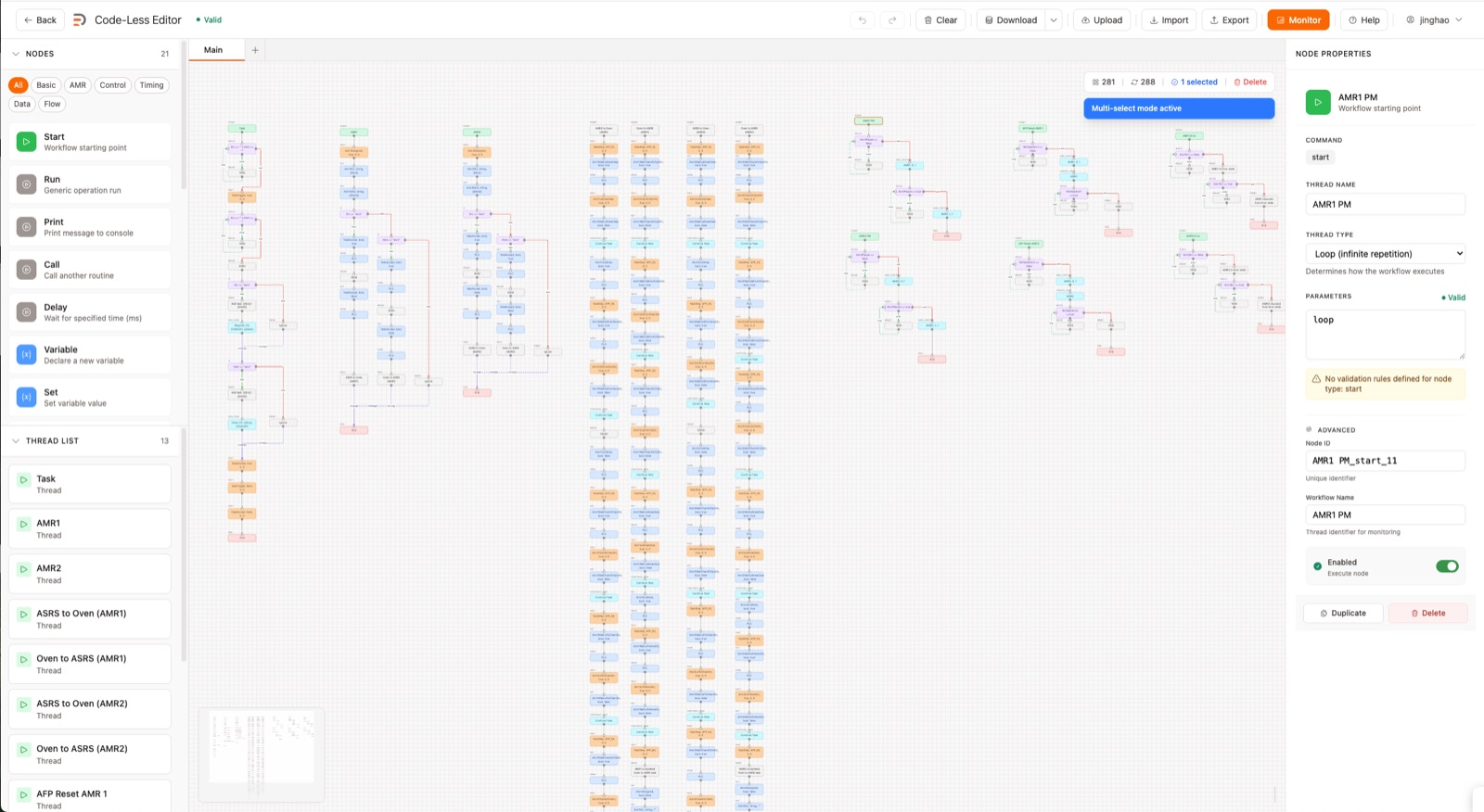
No developer required · Change in minutes
Code-Less workflow editor

Watch it run. In real time.

Monitor execution as it happens and step in the moment something needs attention.

  • → Live thread visualization — every active node highlighted as the workflow executes
  • → Runtime logs — full execution history and state tracking for every thread
  • → Direct execution controls — start, pause, or stop a running workflow at any time
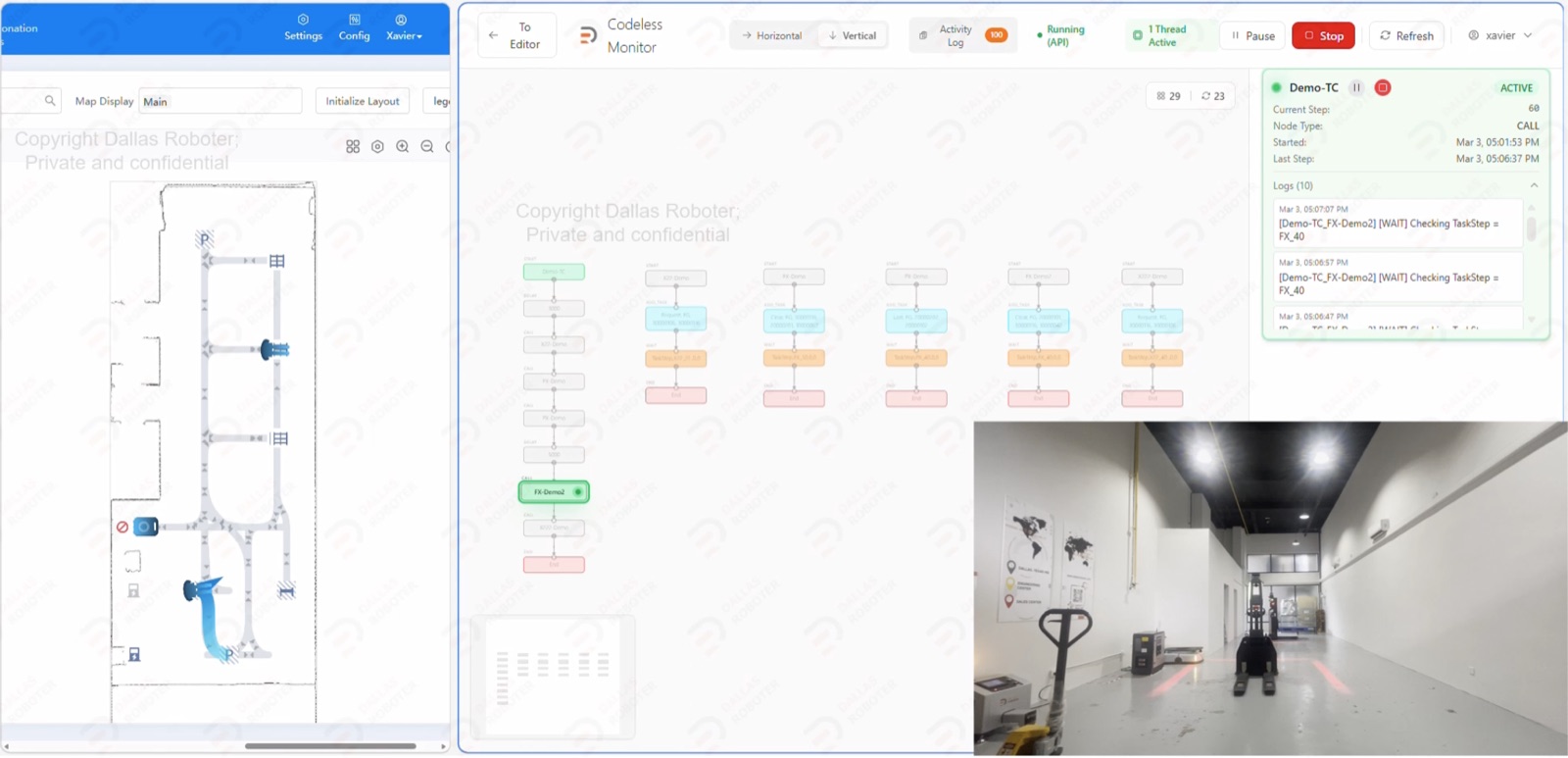
Code-Less real-time monitor
How Easy

Three steps. That's it.

01

Drag

Pull nodes from Basic Operations, Data, Control Flow, Timing, and AMR Operations onto the canvas.

02

Connect

Link node outputs to inputs to define exactly how the logic should flow.

03

Run

Validate, then execute and monitor live — start, pause, or stop a workflow at any time.

Why Code-Less

The easy way to run Physical AI.

No Developer Queue

Change process logic yourself — iteration no longer routes through a dev backlog or waits on scarce developer time.

Change It Yourself

Live Validation

A live indicator confirms the workflow is valid before it runs, catching broken logic before it ever reaches production.

Fewer Errors

One Platform

Process logic and AMR operations in a single environment — from the canvas to the fleet.

Built-In Flexibility
Under the Hood · RCS

Schedule the fleet. In milliseconds.

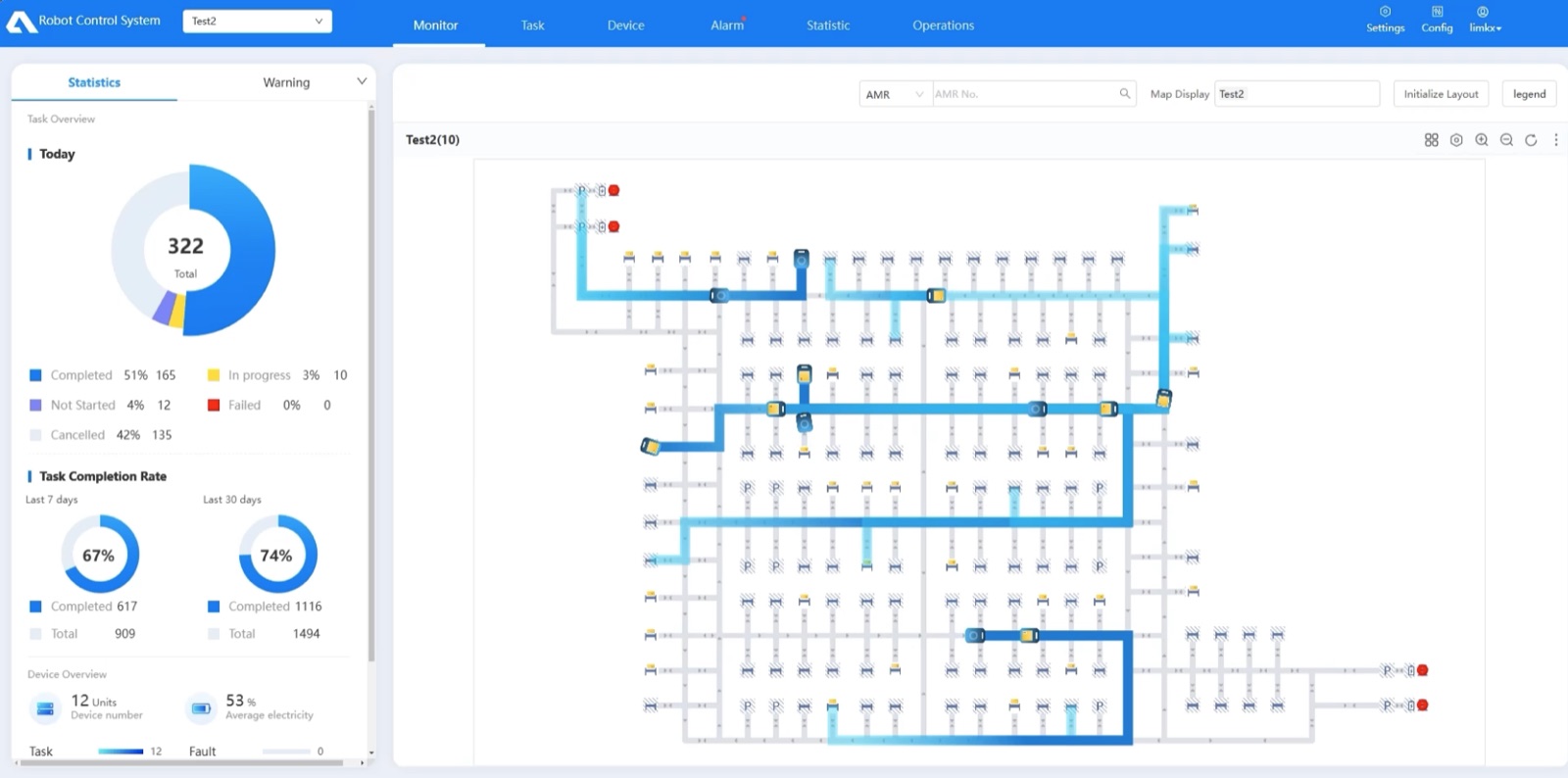
The RCS is the Robot Control System — the single interface to set up, schedule, and orchestrate your fleet. Import the SLAM map, add devices and charging stations, configure tasks, and monitor alarms and throughput in real time.

Setup & Map

Import the LiDAR SLAM map. Add AMR devices and charging-station models — multiple models coexist on one map. Access remotely by IP from anywhere on your network.

Live Status Dashboard

Task Configuration

Configure tasks with templates, define the target point, and assign a specific vehicle. Select task targets directly on the RCS map for clear visualization.

Map-Based Targeting

Alarms & O&M

Monitor AMR alarms in real time, with detailed diagnostics and a complete alarm history log for analysis, troubleshooting, and performance tracking.

Remote Supervision

Statistics

Task throughput and server performance visualized as intuitive graphs — enabling data-driven decisions and continuous optimization at scale.

Data-Driven Ops
RCS Scheduling Algorithm

Optimized coordination for maximum efficiency.

01

Global Path Planning

Enhanced A* algorithm integrating motion models, road width, point rotation, and orientation constraints — compatible with different vehicle types.

02

Safety Detection

Multi-vehicle collision detection based on the Separating Axis Theorem, plus traffic prediction and autonomous obstacle avoidance.

03

Traffic Management

Region-specific traffic control with right-of-way priority, early avoidance, abnormal-obstacle bypass, and cold/hot zone automatic diversion.

04

Task Allocation

Dynamic allocation adapting to multiple constraints, with segmented-path dispatch and right-of-way control beyond fixed nodes.

Built for scale.

  • → Millisecond-level path planning for individual AMRs
  • → Optimal allocation for thousands of concurrent tasks
  • → Up to 500 devices per server, with multi-server cluster support
  • → 300 AMRs processing 25,000 tasks per hour
Multi-industry · Mixed-fleet compatible
RCS scheduling system
Under the Hood · Task Manager

Connect your operation to the fleet.

The Task Manager is how your team actually works with the system — assigning tasks, tracking progress, managing containers, and integrating with your facility's own signals.

Task Manager

Process task commands from the UI to the RCS and collect task, robot, alarm, and shelf data for sharing between modules.

Command & Data Hub

Container Manager

Manage container data (table, rack, pallet) from the RCS and make selection or placement decisions based on task commands.

Container Intelligence

UI Dashboard

An overview of production — overall task progression, output count, and date filters — on a web interface accessible from any device on your network.

Production Overview

Callbox IO & Manager

Self-developed hardware to retrieve client-side signals via IO, PLC, MQTT, or Modbus, processed into task commands and flow logic.

Signal Integration
System Architecture

Four layers. One system.

From your business systems to the robots on the floor, the software is built as a layered stack — each layer plugging into the next.

  • → Business System Layer — ERP, MES, WMS, and iWMS for warehousing, data, and business management
  • → Scheduling System Layer — Algorithm Service, the ICS Integrated Control System, and RCS for dispatching, location, and task management
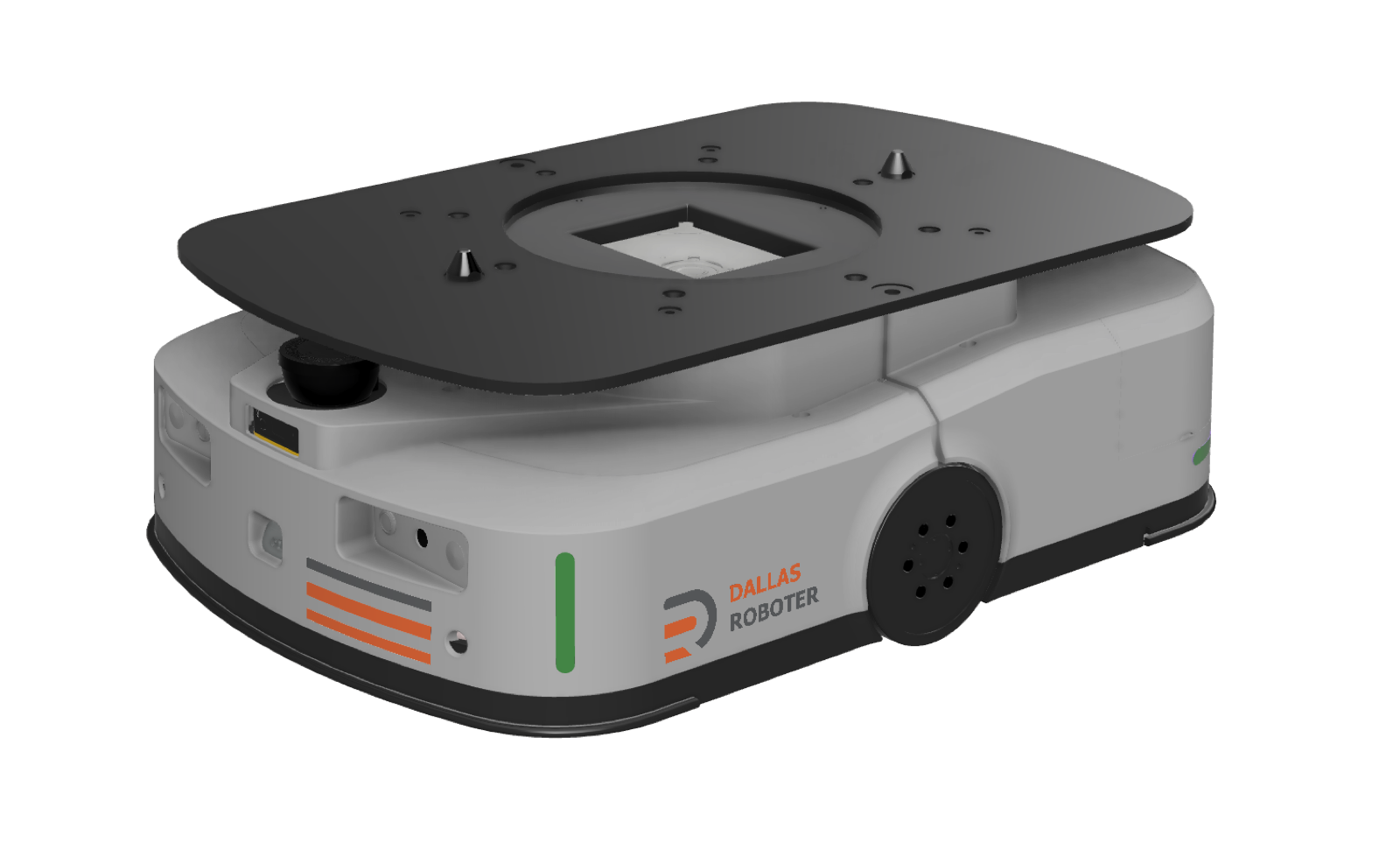
  • → Execution Layer — the DR AMR family (forklift, transfer, ACR), third-party devices, and sensory equipment
  • → Third-Party Device Control + System O&M — DSS, RCS App, Robot Simulator, Robot App, and operational tools
Business → Scheduling → Execution
DR software system architecture
By the Numbers

Software built for real floors.

500
Devices / Server

Real-time scheduling, with multi-server cluster support.

25,000
Tasks / Hour

300 AMRs processing at scale, in a single operation.

ms
Path Planning

Millisecond-level planning for individual AMRs.

2–4 wk
Deployment

From assessment to operational — with the software included.

See Code-Less in action.

Request a live walkthrough of Code-Less and the RCS with our engineering team.

← See how the material moves itself on your floor

askme@dallasroboter.com · DFW, Texas · Engineering: Cyberjaya, Malaysia